> For the complete documentation index, see [llms.txt](https://docs.complycube.com/documentation/llms.txt). Markdown versions of documentation pages are available by appending `.md` to page URLs; this page is available as [Markdown](https://docs.complycube.com/documentation/sdks/web-integrations/hosted-solution-quick-guide/hosted-solution-quick-guide-1.md).
# Check-Driven Integration
Build hosted KYC verification journeys with direct control over checks handling.
## Overview
This guide walks you through integrating the Hosted Solution with ComplyCube using the check-driven approach, giving you direct control over individual verification steps.
{% hint style="info" %}
For a quick copy-paste example, use our [integration assistant](https://portal.complycube.com/developers).
{% endhint %}
{% hint style="warning" %}
You’re viewing the **check-driven** SDK guide - an approach that provides detailed control but is best suited for **partners** or **advanced use cases.** We recommend using **workflow integration** for most implementations.
{% endhint %}
## Integration guide
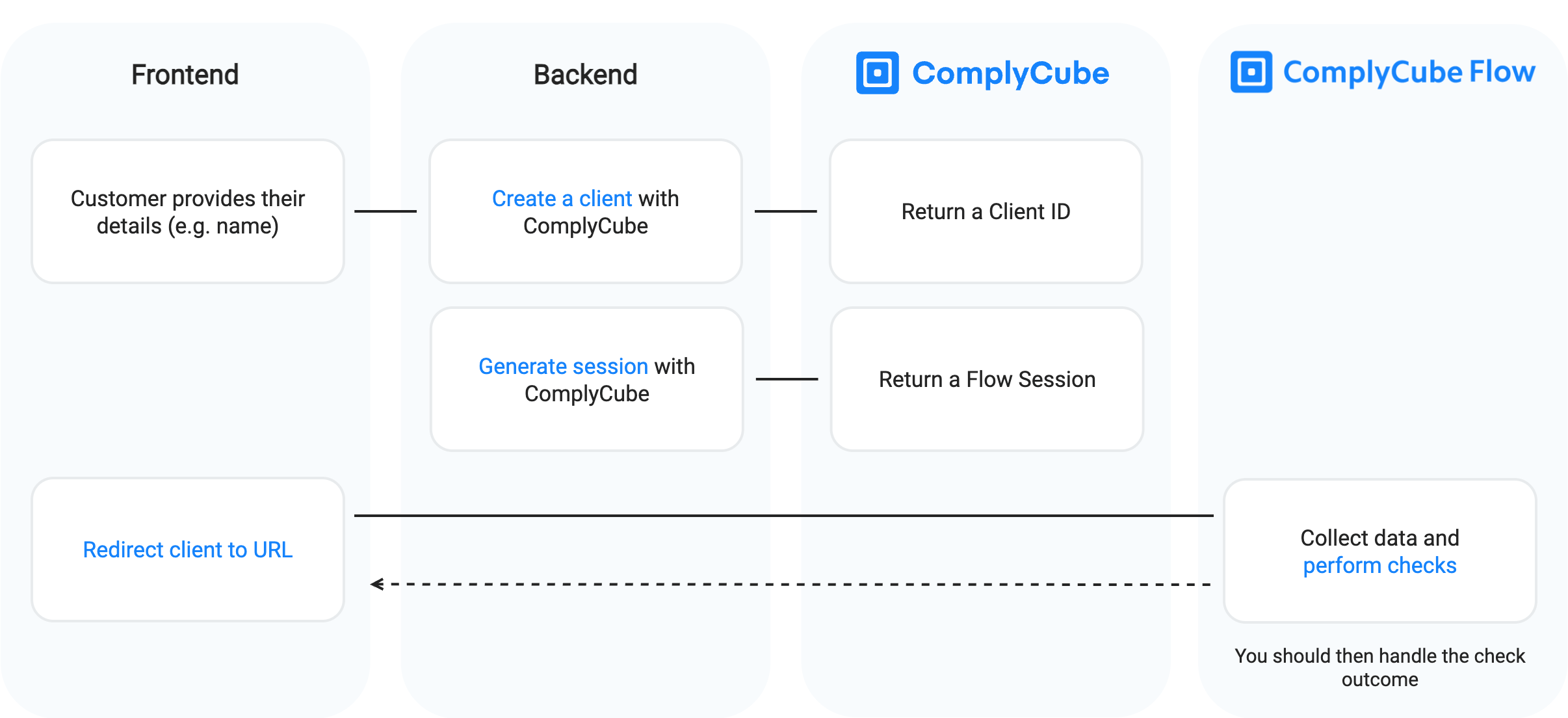
Flow Integration Guide (Hosted Solution)
ComplyCube's Hosted Solution requires a **Hosted Solution session** to be initiated by your backend. Here’s how it works:
{% stepper %}
{% step %}
#### **Create a client**
Every Hosted Solution session starts with a **client** (i.e. customer). Use the API to [create the client](/documentation/api-reference/core-resources/clients/create-a-client.md).
**Example request**
{% tabs %}
{% tab title="cURL" %}
```bash
curl -X POST https://api.complycube.com/v1/clients \
-H 'Authorization: ' \
-H 'Content-Type: application/json' \
-d '{
"type": "person",
"email": "john.doe@example.com",
"personDetails":{
"firstName": "John",
"lastName" :"Doe"
}
}'
```
{% endtab %}
{% tab title="Node.js" %}
```javascript
const { ComplyCube } = require("@complycube/api");
const complycube = new ComplyCube({ apiKey: "" });
const client = await complycube.client.create({
type: "person",
email: "john.doe@example.com",
personDetails: {
firstName: "John",
lastName: "Doe"
}
});
```
{% endtab %}
{% tab title="Python" %}
```python
from complycube import ComplyCubeClient
cc_api = ComplyCubeClient(api_key='')
new_client = {
'type':'person',
'email':'john.doe@example.com',
'personDetails': {
'firstName':'John',
'lastName':'Doe'
}
}
client = cc_api.clients.create(**new_client)
```
{% endtab %}
{% tab title="PHP" %}
```php
use ComplyCube\ComplyCubeClient;
$ccapi = new ComplyCubeClient('');
$result = $ccapi->clients()->create([
'type' => 'person',
'email' => 'john@doe.com',
'personDetails' => [
'firstName' => 'John',
'lastName' => 'Doe'
]
]);
```
{% endtab %}
{% tab title=".NET" %}
```csharp
using ComplyCube.Net;
using ComplyCube.Net.Resources.Clients;
var clientApi = new ClientApi(new ComplyCubeClient(""));
var newClient = new ClientRequest {
type = "person",
email = "john@doe.com",
personDetails = new PersonDetails {
firstName = "John",
lastName = "Doe"
}
}
var client = await clientApi.CreateAsync(newClient);
```
{% endtab %}
{% endtabs %}
**Example response**
The response will contain an `id` (the Client ID). It is required for the next step.
```json
{
"id": "5eb04fcd0f3e360008035eb1",
"type": "person",
"email": "john.doe@example.com",
"personDetails": {
"firstName": "John",
"lastName": "Doe",
},
"createdAt": "2020-01-04T17:24:29.146Z",
"updatedAt": "2020-01-04T17:24:29.146Z"
}
```
{% hint style="info" %}
See [Clients API Reference](/documentation/api-reference/core-resources/clients.md) to learn more.
{% endhint %}
{% endstep %}
{% step %}
#### Generate a Hosted Solution session
A **Hosted Solution session** creates a unique ComplyCube URL that you can use to redirect your customers to complete their identity verification. Once complete, your clients will be redirected to your chosen URL.
**Example request**
{% tabs %}
{% tab title="cURL" %}
```bash
curl -X POST https://api.complycube.com/v1/flow/sessions \
-H 'Authorization: ' \
-H 'Content-Type: application/json' \
-d '{
"clientId":"CLIENT_ID",
"checkTypes": ["extensive_screening_check", "identity_check", "document_check"],
"successUrl": "https://www.yoursite.com/success",
"cancelUrl": "https://www.yoursite.com/cancel"
}'
```
{% endtab %}
{% tab title="Node.js" %}
```javascript
const { ComplyCube } = require("@complycube/api");
const complycube = new ComplyCube({ apiKey: "" });
const session = await complycube.flow.createSession("CLIENT_ID", {
checkTypes: [
"extensive_screening_check",
"identity_check",
"document_check"
],
successUrl: "https://www.yoursite.com/success",
cancelUrl: "https://www.yoursite.com/cancel",
theme: "light"
});
```
{% endtab %}
{% tab title="Python" %}
```python
from complycube import ComplyCubeClient
cc_api = ComplyCubeClient(api_key='')
flow_session = {
'clientId': client.id,
'checkTypes':[
'extensive_screening_check',
'identity_check',
'document_check'
],
'successUrl':'https://www.yoursite.com/success',
'cancelUrl':'https://www.yoursite.com/cancel',
'theme': 'light'
}
session = cc_api.flow.create(**flow_session)
```
{% endtab %}
{% tab title="PHP" %}
```php
use ComplyCube\ComplyCubeClient;
$ccapi = new ComplyCubeClient('');
$session = $ccapi->flow()->createSession([
'clientId' => $clientId,
'checkTypes' => [
'extensive_screening_check',
'identity_check',
'document_check'
],
'successUrl' => 'https://www.yoursite.com/success',
'cancelUrl' => 'https://www.yoursite.com/cancel',
'theme' => 'light'
]);
```
{% endtab %}
{% tab title=".NET" %}
```csharp
using ComplyCube.Net;
using ComplyCube.Net.Resources.FlowSessions;
var fSession = new FlowSessionApi(new ComplyCubeClient(""));
var flowSession = new FlowSessionRequest {
clientId = aClient.id,
checkTypes = new string[] {
"extensive_screening_check",
"identity_check",
"document_check"
},
successUrl = "http://complycube.com",
cancelUrl = "http://complycube.com"
};
var result = fSession.CreateAsync(flowSession).Result;
```
{% endtab %}
{% endtabs %}
**Example response**
{% code overflow="wrap" %}
```json
{
"redirectUrl": "https://flow.complycube.com/test_ODdkNjhiOTU0MzY4YmE5NjRmMDMyY2E5MWYwZjgxNjMzZTcyMWJmNzU2YjZmNDQ4NmFjMTU0ZGZhYTU5MmNhY2NiNjI3ZDE4YWJkYmU2M2M3ZWYzZTlmM2M3MzgxMmM3NzZhMjVlYmQyNDI0ODdkOWQ3M2JiMjkxZTYxNzdhYmExMGEzOGRhYmM2OTIwMjgyYmEzZGY3ZDY0NWZhMjcwN2RlMTFkOTcxZWNhOWI2Zjg0NjllZGNkODVjYzMzMDA5YjdlMWY5OGIwMmZjY2UzNGI2YTMxOGQxNGZmNGFhYjczNzU0YmYwMjFkMzU1M2FjMjQ4ZDQ2ZjJjZTY4YWY0MzIxNjVlMDRjOTIyYTExMTlmMWU3YTYwMDY1NGJmYWM0NTA2MDE5NTg5NTkxYzA4MzYyYTUyM2I0NDM4OGExNWIyMTIzYTBhNDc0NDA4NWM2ZTQwMmNjMGVjMTk2YW"
}
```
{% endcode %}
{% hint style="info" %}
See [Flow Sessions API Reference](/documentation/api-reference/other-resources/tokens.md) to learn more.
{% endhint %}
{% endstep %}
{% step %}
#### Redirect the client to the URL
Redirect your client to the `redirectUrl` generated in the previous step. Once the customer completes the flow on the hosted solution:
1. ComplyCube will automatically run the checks you selected when creating the session (as specified in `checkTypes`).
2. The customer will be redirected to the `successUrl` you provided.
You can access the results and a detailed breakdown of each check via the API or Web Portal. If you’ve **configured webhooks**, ComplyCube will send a notification upon completion of each check.
{% endstep %}
{% endstepper %}
## Branding
You can customize colors, logos, and other branding elements through the [brand settings page](https://portal.complycube.com/settings/branding), if available on your plan.
---
# Agent Instructions
This documentation is published with GitBook. GitBook is the documentation platform designed so that both humans and AI agents can read, navigate, and reason over technical content effectively. Learn more at gitbook.com.
## Querying This Documentation
If you need additional information that is not directly available in this page, you can query the documentation by asking a question.
Perform an HTTP GET request on the following URL with the `ask` and `goal` query parameters:
```
GET https://docs.complycube.com/documentation/sdks/web-integrations/hosted-solution-quick-guide/hosted-solution-quick-guide-1.md?ask=&goal=
```
`ask` is the immediate question: it should be specific, self-contained, and written in natural language.
`goal` is what the user is ultimately trying to achieve, the reason they need the answer. Sharing it helps GitBook give you a better, more relevant answer. A goal is most helpful when it describes the outcome the user wants rather than restating the question. For example, with `ask=how do I create an API token`, a goal like `automate deployments from our CI pipeline` lets GitBook tailor the answer to that use case.
The response will contain a direct answer to the question and relevant excerpts and sources from the documentation.
Use this mechanism when the answer is not explicitly present in the current page, you need clarification or additional context, or you want to retrieve related documentation sections.