# Multi-Bureau Check

### Multi-Bureau Check Overview

A Multi-Bureau Check is an **identity** and **address verification** service commonly used in KYC onboarding workflows.

ComplyCube matches customer details against multiple trusted and authoritative data sources to verify identity attributes and confirm address information.

Our extensive [service coverage](/documentation/product-guides/identity-verification/multi-bureau-check/service-coverage.md) enables businesses to verify customers across multiple supported countries and trusted data sources. These data sources include:

<table><thead><tr><th width="245.48046875">Data Source</th><th>Description</th></tr></thead><tbody><tr><td><strong>Credit Agencies</strong></td><td>Data provided by credit reference agencies.</td></tr><tr><td><strong>Government Authorities</strong></td><td>Official records from government authorities such as motor vehicle registries, electoral rolls, land and property registries, court filings, and other authoritative datasets.</td></tr><tr><td><strong>Utility Authorities</strong></td><td>Data from utility providers, including water, gas, electricity, and other service accounts.</td></tr><tr><td><strong>Postal Authorities</strong></td><td>Address and identity data provided by national and regional postal authorities.</td></tr><tr><td><strong>Telecom Agencies</strong></td><td>Data from mobile and landline telecom providers.</td></tr><tr><td><strong>Proprietary Databases</strong></td><td>Exclusive datasets curated and provided by trusted 3rd partners.</td></tr><tr><td><strong>Commercial Databases</strong></td><td>Private or commercial datasets where individuals have opted in and consented to share their details for verification purposes.</td></tr><tr><td><strong>Consumer Databases</strong></td><td>Opt-in consumer data, marketing databases, and other similar data sets.</td></tr><tr><td><strong>Other Sources</strong></td><td>Data collected from 3rd party providers that combine information from multiple sources into a single record.</td></tr></tbody></table>

{% hint style="info" %}
[Learn about the Multi-Bureau Checks API.](/documentation/api-reference/check-types/multi-bureau-check.md)
{% endhint %}

### Common use cases

Multi-Bureau Checks are typically used for:

* **No-document identity verification**: Validate customer identity without requiring an ID document upload.
* **Cross-source identity validation**: Match customer details against multiple trusted data providers to confirm consistency and accuracy.
* **Credit bureau identity checks**: Perform identity and address verification using credit bureau data where applicable.
* **Fraud risk reduction**: Identify discrepancies across authoritative sources that may indicate synthetic or stolen identities.

### How the check works

ComplyCube searches for a bureau record matching the submitted customer details.

It then verifies identity and address attributes across one or more sources.

You can use the results to support customer due diligence (CDD) decisions.

{% hint style="info" %}
This service includes a **2+2 check** variant that verifies at least two identity attributes with **two or more separate bureaus**. Get in touch with your Account Manager or [contact us](https://www.complycube.com/sales) to enable it.
{% endhint %}

### Analysis performed

ComplyCube verifies key customer details against multiple [trusted sources](/documentation/product-guides/identity-verification/multi-bureau-check/service-coverage.md). This improves confidence in the accuracy of identity and address data.

**Verifiable attributes** include:

1. Name
2. Date of birth (DOB)
3. Address
4. ID number (e.g. SSN, Social Insurance Number, National Identity Number, or Tax Number)

By default, customer details are considered verified when at least the **name** and **one additional attribute** match in a bureau record. This verification can occur in one of the following ways:

1. Name + DOB match
2. Name + Address match
3. Name + ID number match

{% hint style="info" %}
ComplyCube will attempt to match all attributes if possible: **name**, **address**, **DOB**, and **ID number**.
{% endhint %}

{% hint style="info" %}
Names are matched intelligently against source records using **spelling variations**, **initials**, and other **common name variants** to the fullest extent supported by the available data source.
{% endhint %}

### Sample result

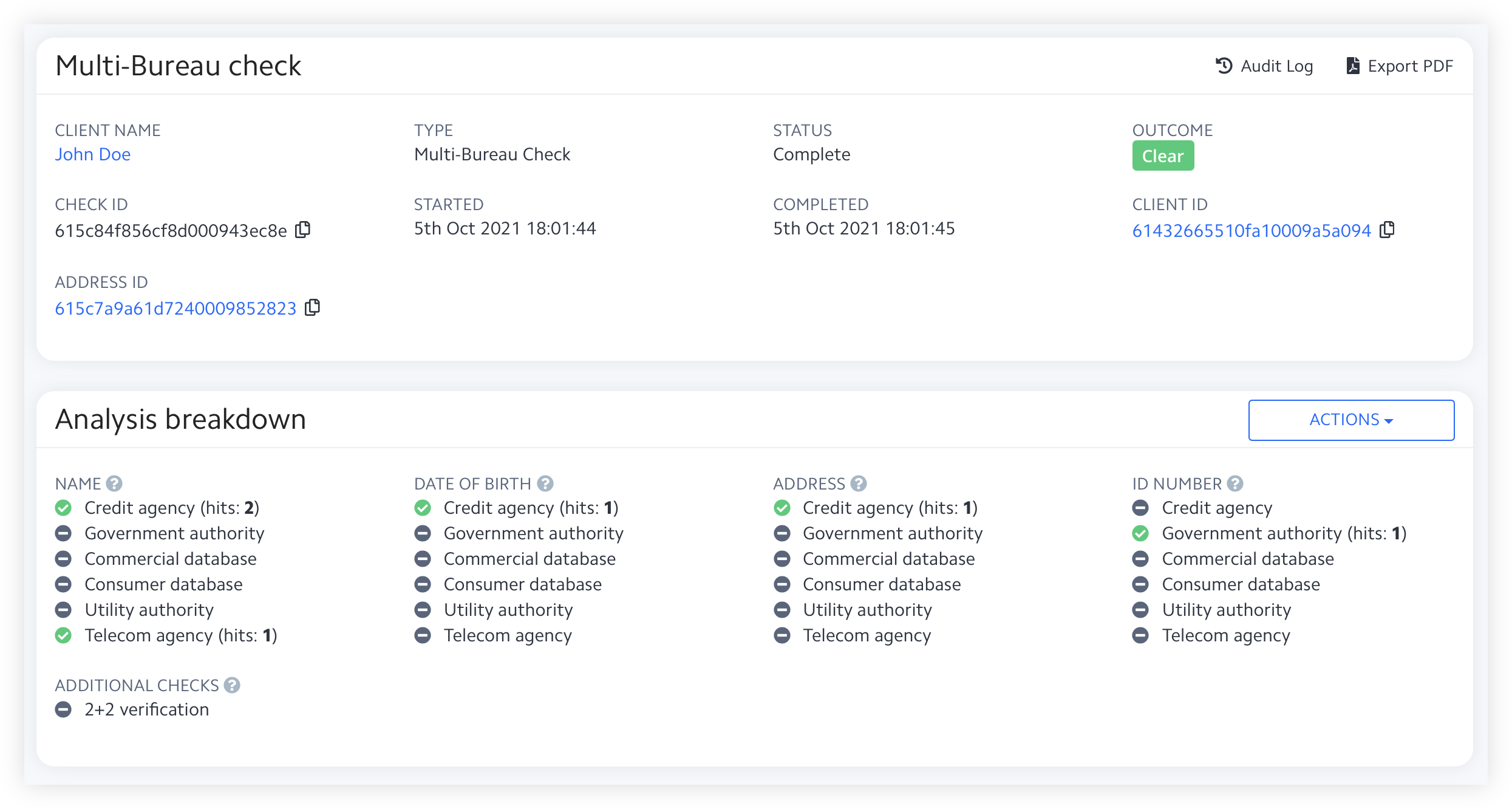
The example below shows a representative Multi-Bureau Check result for identity and address verification outcomes.

Use it to see how matched attributes, source coverage, and verification findings may appear in a Multi-Bureau Check report.

<figure><img src="/files/-MlGPPAU3THsp8gqKHS7" alt=""><figcaption></figcaption></figure>

{% hint style="info" %}
This example is illustrative. Exact fields, values, and layout may vary by country, data source, workflow, configuration, and result.
{% endhint %}

### Check duration

A Multi-Bureau Check takes **under 4 seconds** to complete.

### Frequently asked questions

<details>

<summary>What is a Multi-Bureau Check?</summary>

A Multi-Bureau Check verifies a customer’s identity and address against multiple trusted data sources.

These sources can include credit agencies, government records, utility data, postal records, telecom data, and other authoritative datasets.

</details>

<details>

<summary>Can I verify identity without asking the customer to upload a document?</summary>

Yes.

Multi-Bureau Check supports **no-document identity verification** by matching customer details against trusted data sources.

If you also need document authenticity checks, add [Document Check](/documentation/product-guides/identity-verification/document-check.md).

</details>

<details>

<summary>How is Multi-Bureau Check different from eID Check?</summary>

Multi-Bureau Check verifies customer details against authoritative records and trusted data providers.

[eID Check](/documentation/product-guides/identity-verification/eid-check.md) requires the customer to complete live authentication with a supported eID scheme or identity provider.

</details>

<details>

<summary>What is a 2+2 check?</summary>

A **2+2 check** verifies at least **two identity attributes** against **two or more separate bureaus**.

This can provide stronger assurance for certain onboarding and compliance flows.

</details>

<details>

<summary>Can I use Multi-Bureau Check inside a workflow?</summary>

Yes.

You can run Multi-Bureau Check inside [Workflows](/documentation/product-guides/compliance-studio/workflows.md) and combine it with checks such as [Document Check](/documentation/product-guides/identity-verification/document-check.md), [Identity Check](/documentation/product-guides/biometric-and-liveness-verification/identity-check.md), [AML Screening Check](/documentation/product-guides/watchlist-pep-and-adverse-media/aml-screening-check.md), and [Proof of Address Check](/documentation/product-guides/kyc-automation-services/proof-of-address-check.md).

</details>

<details>

<summary>Which checks are commonly combined with Multi-Bureau Check in KYC?</summary>

Multi-Bureau Check is often combined with [Document Check](/documentation/product-guides/identity-verification/document-check.md), [Identity Check](/documentation/product-guides/biometric-and-liveness-verification/identity-check.md), [Proof of Address Check](/documentation/product-guides/kyc-automation-services/proof-of-address-check.md), [Compliance Policies](/documentation/product-guides/compliance-studio/policies.md), and [AML Screening Check](/documentation/product-guides/watchlist-pep-and-adverse-media/aml-screening-check.md).

This helps you move from data-source verification to a broader KYC and compliance decision in one [Workflow](/documentation/product-guides/compliance-studio/workflows.md).

</details>

### Related checks

You’ll typically run Multi-Bureau Check alongside:

* [Document Check](/documentation/product-guides/identity-verification/document-check.md) for ID document verification.
* [Identity Check](/documentation/product-guides/biometric-and-liveness-verification/identity-check.md) for liveness and selfie verification.
* [Proof of Address Check](/documentation/product-guides/kyc-automation-services/proof-of-address-check.md) for document-based address verification.
* [AML Screening Check](/documentation/product-guides/watchlist-pep-and-adverse-media/aml-screening-check.md) for sanctions, PEP, and adverse media.
* [SSN Check](/documentation/product-guides/identity-verification/ssn-check.md) for US-specific SSN validation.

### Related topics

Use these when configuring Multi-Bureau Checks in a broader onboarding journey:

* [Workflows](/documentation/product-guides/compliance-studio/workflows.md) to orchestrate Multi-Bureau Check alongside other checks.
* [Policies](/documentation/product-guides/compliance-studio/policies.md) to apply consistent decision rules across workflow sessions.
* [Smart Forms](/documentation/product-guides/compliance-studio/smart-forms.md) to capture customer information and declarations for compliance.


---

# Agent Instructions: Querying This Documentation

If you need additional information that is not directly available in this page, you can query the documentation dynamically by asking a question.

Perform an HTTP GET request on the current page URL with the `ask` query parameter:

```
GET https://docs.complycube.com/documentation/product-guides/identity-verification/multi-bureau-check.md?ask=<question>
```

The question should be specific, self-contained, and written in natural language.
The response will contain a direct answer to the question and relevant excerpts and sources from the documentation.

Use this mechanism when the answer is not explicitly present in the current page, you need clarification or additional context, or you want to retrieve related documentation sections.