> For the complete documentation index, see [llms.txt](https://docs.complycube.com/documentation/llms.txt). Markdown versions of documentation pages are available by appending `.md` to page URLs; this page is available as [Markdown](https://docs.complycube.com/documentation/product-guides/identity-verification/document-check/redaction.md).
# Redaction (data masking)
Automatically redact and mask PII in KYC document verification to protect sensitive data, support GDPR compliance, and strengthen privacy controls.
### Overview
ComplyCube automatically applies **field-level redaction** (also known as **field masking** or **data masking**) on sensitive **personally identifiable information (PII)** fields to ensure compliance with global privacy regulations.
Examples of redacted fields include:
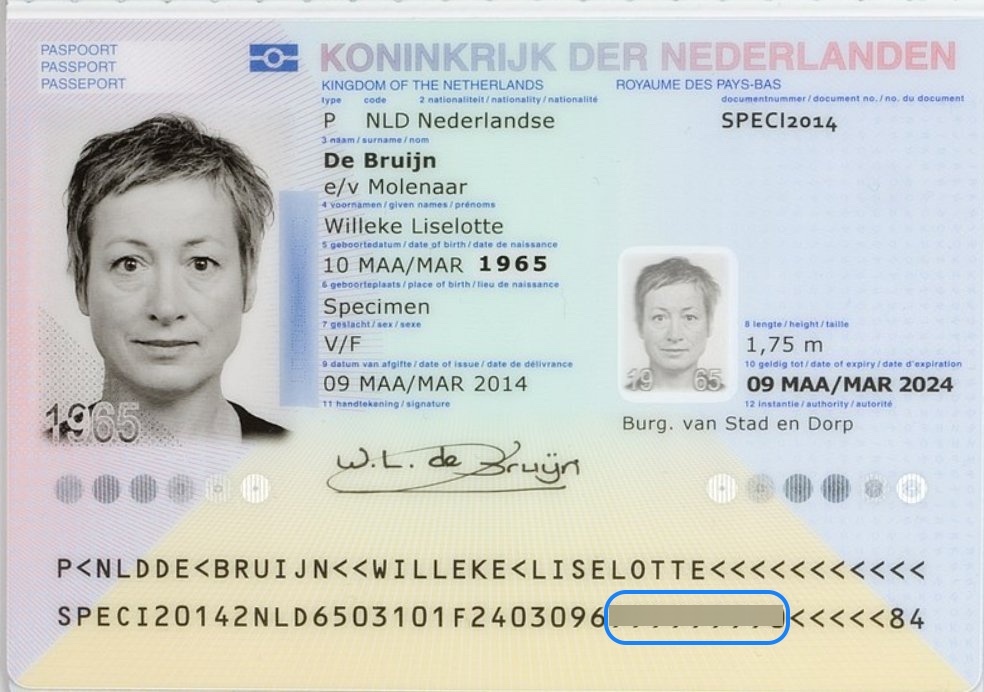
* **Dutch BSN** (Burgerservicenummer or Dutch Citizen Service Number)
* **Singapore NRIC** (National Registration Identity Card Number)
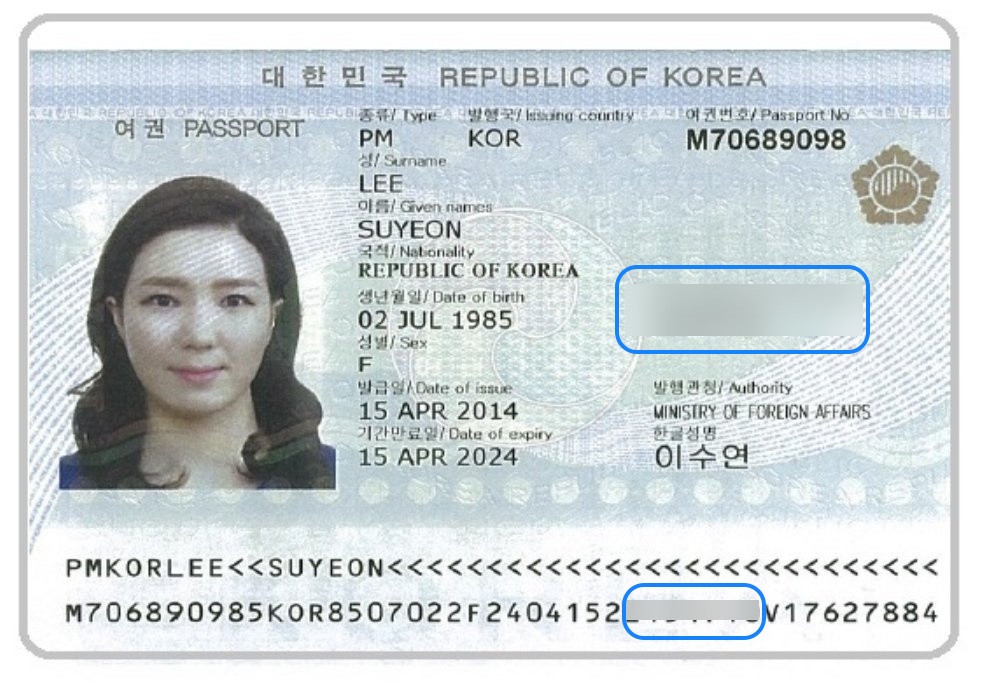
* **Korean RRN** (Resident Registration Number)
{% hint style="info" %}
To meet strict compliance requirements, sensitive fields are automatically redacted from **document images** stored in the customer record and the results of **Document Checks**. Where applicable, redaction is applied to both the **front and back** of the document.
{% endhint %}
{% hint style="info" %}
Users on our **Growth** or **Enterprise** **plans** can customize and add additional fields to their [redaction policies](https://portal.complycube.com/policies). Please contact your Account Manager to update your policy.
{% endhint %}
### Scope
Redaction is applied immediately on document capture, before the document image is stored. All instances of sensitive fields are masked, including those encoded within **QR codes**, the **Visual Inspection Zone (VIZ)**, the **Machine Readable Zone (MRZ)**, and **barcodes**.
ComplyCube does not **store** or **process** these sensitive fields, ensuring strong privacy protection and full regulatory compliance.
During **Document Check** processing, all redacted text fields return as fixed-length asterisk (\*) strings. This format is consistent across the **API**, **Web Portal**, and **reports**.
### Where redaction is applied
Redaction applies anywhere ComplyCube displays or returns document images or extracted fields, including:
* Stored document images in the customer record (Portal and exports).
* [Document Check](/documentation/product-guides/identity-verification/document-check.md) results returned via API and visible in the Portal.
* Generated reports that include document images or extracted fields.
### Configuring redaction policies
Redaction is enabled by default for supported sensitive fields.
If you need to modify or add masking rules, your redaction configuration can be updated by contacting your Account Manager.
### Sample illustrations of field redaction
Redacted BSN on a Dutch passport
Redacted RRN on a Korean passport
### Frequently asked questions
What does redaction do in ComplyCube?
Redaction masks supported sensitive fields before document images are stored or returned.
This helps reduce privacy risk and supports compliance with data minimization requirements.
Why is redaction important for jurisdiction-specific compliance?
Some jurisdictions restrict the **processing** or **storage** of certain document fields, such as national ID numbers or other regulated identifiers.
Redaction helps meet these requirements by masking supported fields before they are stored or returned in results.
Where is redaction applied?
Redaction applies to stored **document images**, [Document Check](/documentation/product-guides/identity-verification/document-check.md) results, and generated reports.
It also covers sensitive data found in the **VIZ**, **MRZ**, **barcodes**, and supported **QR codes**.
Can I customize which fields are redacted?
Yes.
You can request changes to your redaction policy, including additional fields, if this is available under your plan.
---
# Agent Instructions
This documentation is published with GitBook. GitBook is the documentation platform designed so that both humans and AI agents can read, navigate, and reason over technical content effectively. Learn more at gitbook.com.
## Querying This Documentation
If you need additional information that is not directly available in this page, you can query the documentation by asking a question.
Perform an HTTP GET request on the following URL with the `ask` and `goal` query parameters:
```
GET https://docs.complycube.com/documentation/product-guides/identity-verification/document-check/redaction.md?ask=&goal=
```
`ask` is the immediate question: it should be specific, self-contained, and written in natural language.
`goal` is what the user is ultimately trying to achieve, the reason they need the answer. Sharing it helps GitBook give you a better, more relevant answer. A goal is most helpful when it describes the outcome the user wants rather than restating the question. For example, with `ask=how do I create an API token`, a goal like `automate deployments from our CI pipeline` lets GitBook tailor the answer to that use case.
The response will contain a direct answer to the question and relevant excerpts and sources from the documentation.
Use this mechanism when the answer is not explicitly present in the current page, you need clarification or additional context, or you want to retrieve related documentation sections.