> For the complete documentation index, see [llms.txt](https://docs.complycube.com/documentation/llms.txt). Markdown versions of documentation pages are available by appending `.md` to page URLs; this page is available as [Markdown](https://docs.complycube.com/documentation/product-guides/due-diligence-tools/customisable-thresholds.md).
# Automation
Customize and automate our checks to meet your compliance needs.
{% hint style="warning" %}
### Automation scope and limitations
The Automation feature outlined below applies only to **standalone checks**.
For checks executed within a **Workflow Session**, any automation, business rules, or capture preference should be configured at the check level within the associated **Workflow Template**.
{% endhint %}
## Automation Overview
ComplyCube provides the ability to customize check thresholds and settings. This allows you to automate your checks in line with your **risk-based approach**.
You can amend these automation rules through the [automation settings page](https://portal.complycube.com/automations).
## Screening Check
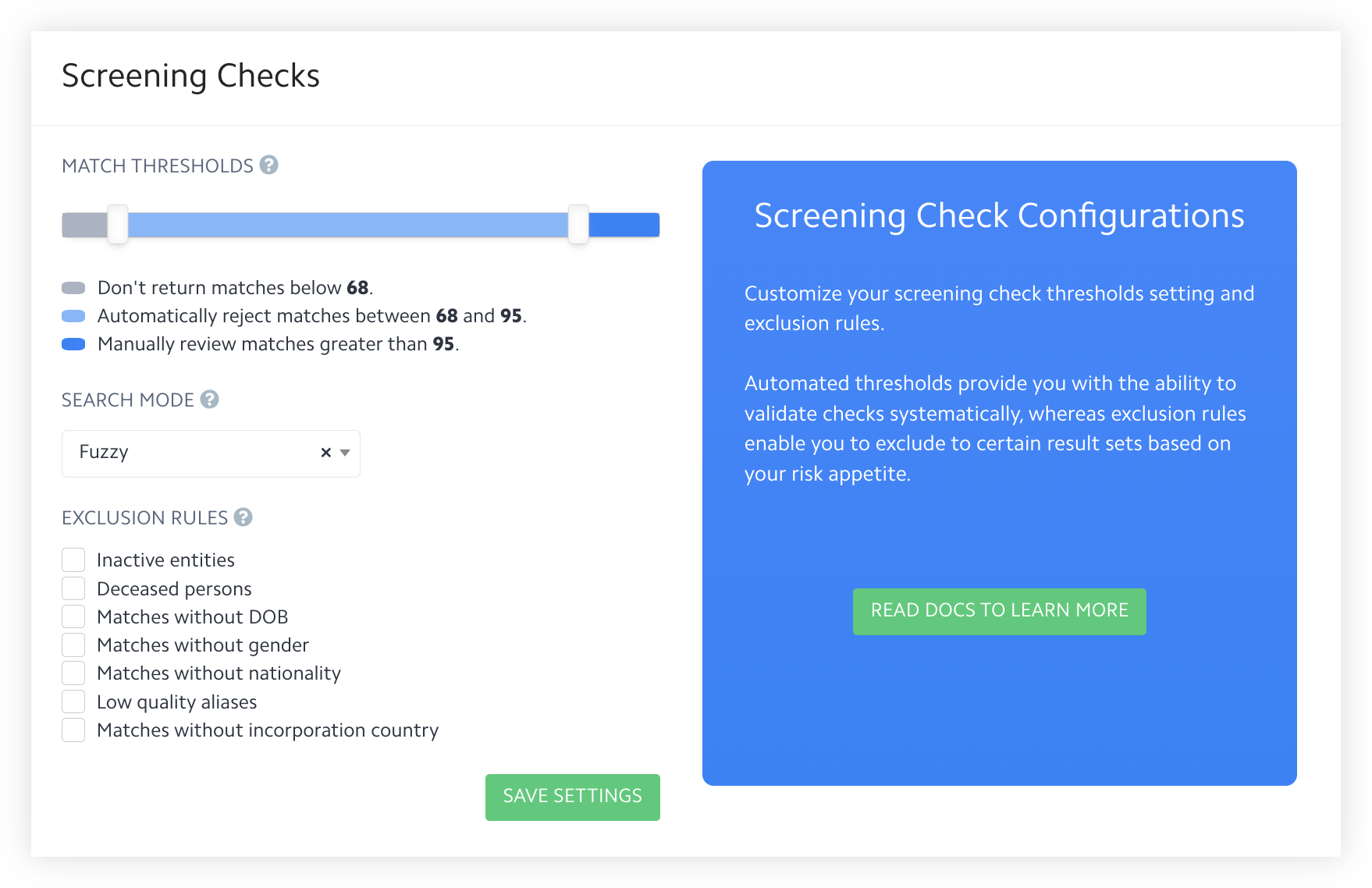
Screening Checks Automation View
### Thresholds
ComplyCube's [AML Screening ](/documentation/product-guides/watchlist-pep-and-adverse-media/aml-screening-check.md)matching engine is purpose-built to find and match comparable identity data from any **language or script**. It incorporates sophisticated fuzzy matching algorithms, heuristics, linguistic variance, and phonetic analysis to find matches without producing costly and time-wasting lists of false positives.
To simplify usage, ComplyCube represents the outcome of the analysis in the form of a **match score**. A match score can range from 0 to 100, with 100 being the best match.
By default, an AML Screening Check will only return matches with a match score over **85** and automatically reject matches with a score ranging between **85** and **90**. Ultimately, only matches with scores higher than 90 will require manual checks.
You can adjust these automation thresholds according to your risk-based framework and internal process.
### Exclusion rules
By default, ComplyCube will not exclude any matches. We will return matches without a DOB, gender, nationality, or incorporation country details. Furthermore, ComplyCube will also return inactive, deceased, and low-quality alias matches.
### Search mode
Depending on your risk tolerance and preference, you can select from two distinct name-matching techniques:
1. **Fuzzy** (default): applies various linguistic, phonetic, and near-match techniques on names to find matches.
2. **Precise:** only matches names that are exact
{% hint style="info" %}
The search mode **only** applies to the name-matching aspect of the Screening Check. ComplyCube utilizes other proprietary algorithms to find matches using other attributes.
{% endhint %}
## Document Check
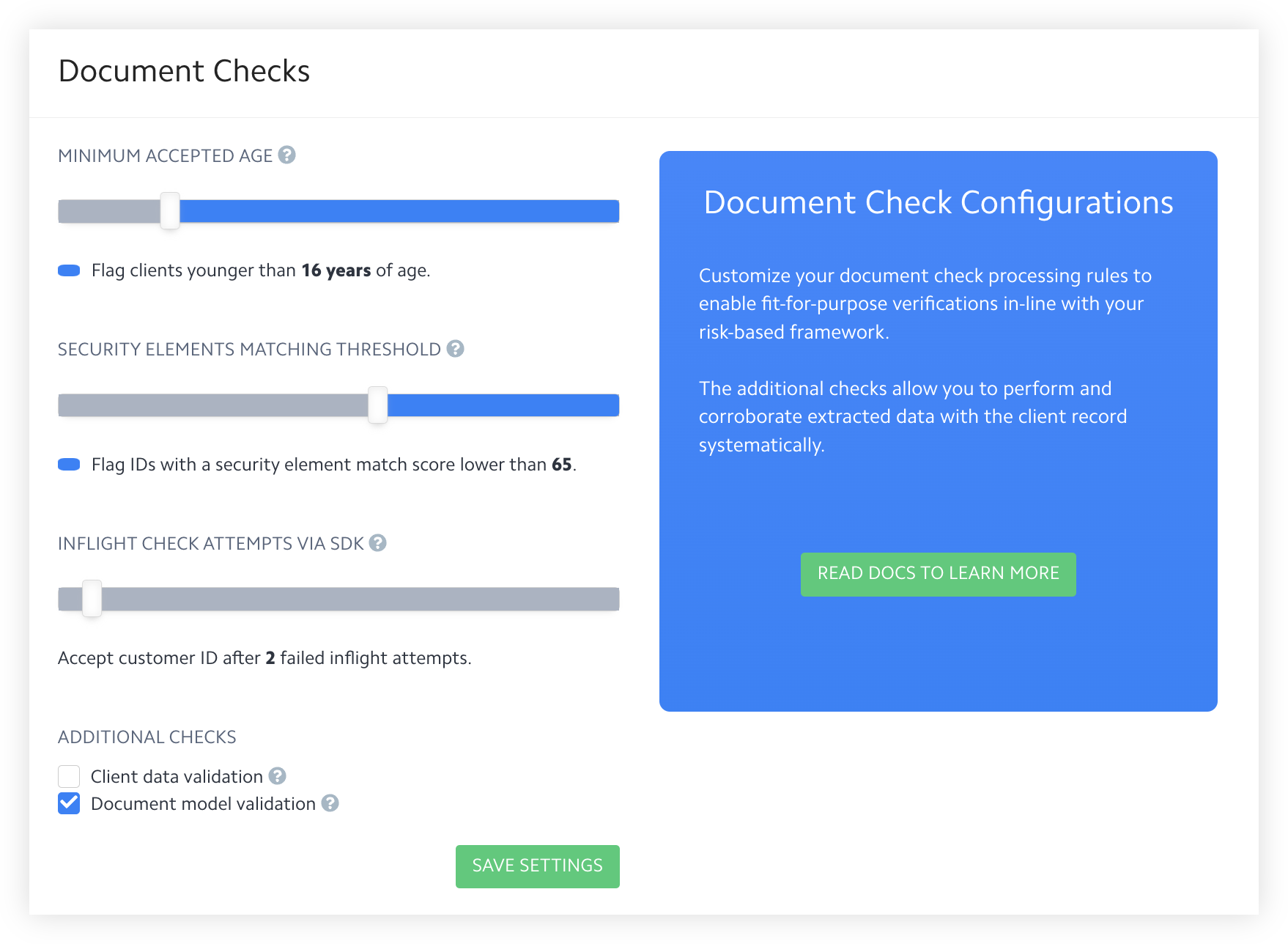
Document Checks Automation View
### Minimum age
ComplyCube's [Document Check](/documentation/product-guides/identity-verification/document-check.md) uses OCR technology and advanced analytics to authenticate and extract data from your clients' ID documents.
This setting empowers **age verification** compliance by allowing you to set a minimum acceptable age before your client ID is flagged.
By default, a Document Check will flag anyone younger than **18 years of age**.
### **Security element matching threshold**
ComplyCube returns a **security element match score** for each analyzed security element present on a document. A match score can range from 0 to 100; the closer the score is to 100, the greater the confidence that the security element is authentic.
By default, a Document check will deem a security element real when the match score is over **65**.
### **Inflight check attempts via SDK**
ComplyCube performs **inflight quality checks** on document images uploaded via the Web and Mobile SDKs. This setting configures the maximum number of times our quality checks are performed before sending a document for full processing, regardless of its quality.
By default, a document's quality will be checked up to **5 times** on upload before it's sent for complete processing.
### Additional checks
ComplyCube extends further optional checks, including:
* **Client data validation**: this check compares the client record data (e.g., first and last names) with data extracted from an ID document.
* **Document model validation**: this check considers the visual consistency, at a pixel level, of a single or two-sided document.
By default, ComplyCube will only perform **document model validation**.
## Identity Check
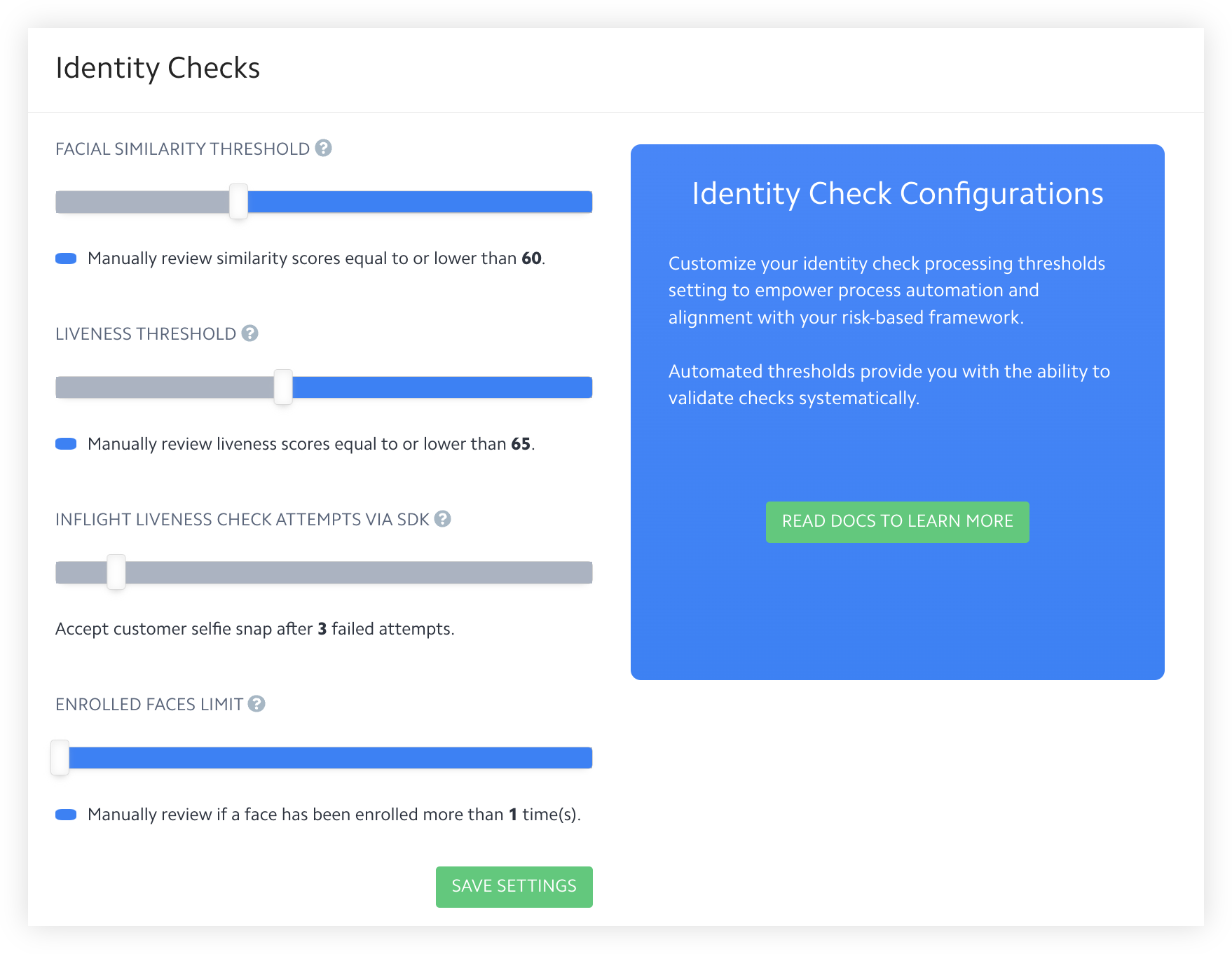
Identity Checks Automation View
ComplyCube's [Identity Check](/documentation/product-guides/biometric-and-liveness-verification/identity-check.md) utilizes computer vision, liveness, spoof-detection technologies, and facial comparison algorithms to determine whether two faces belong to the same client.
### Facial similarity threshold
ComplyCube represents the outcome of a facial analysis in the form of a **facial similarity score**. A facial similarity score can range from 0 to 100, with 100 being an exact match.
By default, an Identity check will deem two faces a match when the facial similarity score is over **80**.
### Liveness threshold
ComplyCube returns a **liveness score**, representing the outcome of a liveness analysis. A liveness score can range from 0 - 100; the closer the score is to 100, the greater the confidence that your client is a real person.
By default, an Identity check will deem a client real when the liveness score is over **50**.
### Enrolled faces limit
ComplyCube returns a **previously** **enrolled** **face** indicator, asserting whether a face was registered as a different client.
By default, an Identity check will deem a face previously enrolled when registered more than **once**.
## Proof of Address Check
### Document age threshold
ComplyCube's [Proof of Address Check](/documentation/product-guides/kyc-automation-services/proof-of-address-check.md) aims to establish the issuing date of an eligible document using OCR. If a document is older than a specified threshold (e.g., 3 months), the **document age analysis** will be flagged for the check.
By default, a Proof of Address check will automatically flag documents older than **3 months**. You can adjust the threshold to be between 1 to 12 months.
## Age Estimation Check
### Minimum age
ComplyCube's [Age Estimation Check](/documentation/product-guides/biometric-and-liveness-verification/age-estimation-check.md) uses facial recognition and liveness detection technology to estimate the age of your clients.
This setting empowers **age estimation** compliance by allowing you to set a minimum acceptable age before your client is flagged.
By default, an Age Estimation check will flag anyone younger than **18 years of age**.
---
# Agent Instructions
This documentation is published with GitBook. GitBook is the documentation platform designed so that both humans and AI agents can read, navigate, and reason over technical content effectively. Learn more at gitbook.com.
## Querying This Documentation
If you need additional information that is not directly available in this page, you can query the documentation by asking a question.
Perform an HTTP GET request on the following URL with the `ask` and `goal` query parameters:
```
GET https://docs.complycube.com/documentation/product-guides/due-diligence-tools/customisable-thresholds.md?ask=&goal=
```
`ask` is the immediate question: it should be specific, self-contained, and written in natural language.
`goal` is what the user is ultimately trying to achieve, the reason they need the answer. Sharing it helps GitBook give you a better, more relevant answer. A goal is most helpful when it describes the outcome the user wants rather than restating the question. For example, with `ask=how do I create an API token`, a goal like `automate deployments from our CI pipeline` lets GitBook tailor the answer to that use case.
The response will contain a direct answer to the question and relevant excerpts and sources from the documentation.
Use this mechanism when the answer is not explicitly present in the current page, you need clarification or additional context, or you want to retrieve related documentation sections.